In my guide to Forex Factory, I’ll walk through the tools that make this platform worth your time — and the ones that aren’t as useful as they first appear. Forex Factory has been a go-to resource for forex traders since 2004, but most users barely scratch the surface of what it offers. The platform’s economic calendar, Trade Explorer, and community forums each solve different problems for different types of traders. Whether you’re learning forex trading or refining a strategy you’ve used for years, knowing how to set up and filter Forex Factory’s tools properly is what separates casual browsing from actionable market intelligence.
“Off-exchange foreign currency trading carries significant risks,” the CFTC states in its retail forex advisory. “In most cases, roughly two out of three accounts lose money.” Tools like Forex Factory don’t eliminate that risk — but they give you better information to work with.
Forex Factory is a free platform built around an economic calendar that tracks market-moving events in a forex market now worth $9.6 trillion in daily volume (BIS Triennial Survey, 2025). Its most valuable features are the calendar’s impact filters, the Trade Explorer performance tracker, and community forums — but only if you configure them properly and apply critical thinking to what you find.
What Is Forex Factory and Why Do Traders Use It?
Forex Factory is a free online platform that provides real-time economic data, news, and community tools for forex traders. According to the BIS Triennial Survey (2025), daily forex trading volume reached $9.6 trillion in April 2025 — up 28% from 2022. In a market that moves this fast, having a centralized source for economic event tracking gives traders an informational edge over those relying on scattered news feeds.
The platform was founded in 2004 by Dimitri Kanellopoulos and operates out of Tampa, Florida. It started as a forum, but what actually draws traffic today is the economic calendar — a real-time tracker of scheduled data releases that affect currency prices. Think Non-Farm Payrolls, CPI prints, central bank rate decisions. The kind of events that can move EUR/USD fifty pips in thirty seconds.
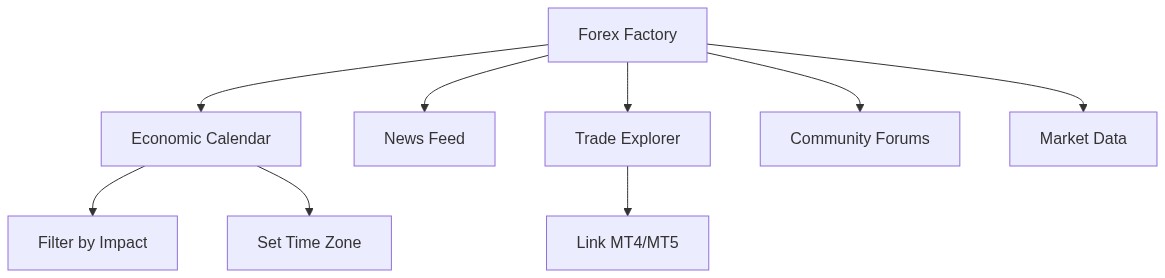
Beyond the calendar, Forex Factory offers five core tools:
- Economic Calendar — scheduled events with impact ratings, forecasts, and actual results
- News feed — aggregated forex market headlines updated in real time
- Trade Explorer — connects to MT4/MT5 accounts to track your trading performance
- Community forums — strategy discussions, trading journals, and broker reviews
- Market data — live quotes and basic charting across major pairs
For a platform that charges nothing, that’s a solid toolkit. The catch? Each feature requires proper setup to be useful. The default settings are too noisy for most traders — you’ll spend more time filtering than analyzing if you don’t configure things from the start.
To understand how these tools fit into the broader picture, review our guide to forex trading basics.
How Do You Set Up the Forex Factory Economic Calendar?
The Forex Factory calendar tracks hundreds of economic events weekly, but only a fraction matter for your trading. According to research from the Bank for International Settlements, the US dollar appears on one side of 89% of all forex trades (BIS, 2025). That single stat tells you where to focus your calendar filters: USD events first, then whatever currency pairs you trade.
Here’s how to configure the calendar so it actually helps:
Step 1 — Set your time zone. Click the clock icon in the top-right corner of the Forex Factory homepage. Select your local time zone. Every event timestamp adjusts automatically. Skip this step and you’ll misread when NFP drops — a mistake that costs real money.
Step 2 — Filter by impact level. Click the filter icon on the calendar page. Select “High” and “Medium” impact events only. Low-impact releases rarely move price in any tradeable way. Red folders mark high-impact events. Orange marks medium. Yellow is low.
Step 3 — Filter by currency. If you only trade EUR/USD and GBP/USD, deselect everything except EUR, USD, and GBP. There’s no reason to track Swiss employment data if you never touch CHF pairs.
Step 4 — Choose your time range. The default view shows the current week. Switch to “Today” if you’re day trading, or “This Month” if you’re planning swing trades around event clusters.
Step 5 — Bookmark the filtered view. Forex Factory remembers your filter settings in your browser. But clear your cookies and they’re gone. Create a free account to save your preferences permanently.
The whole setup takes about three minutes. Those three minutes save you from scrolling through dozens of irrelevant Latvian GDP revisions every morning.
How Should You Read Impact Levels on the Calendar?
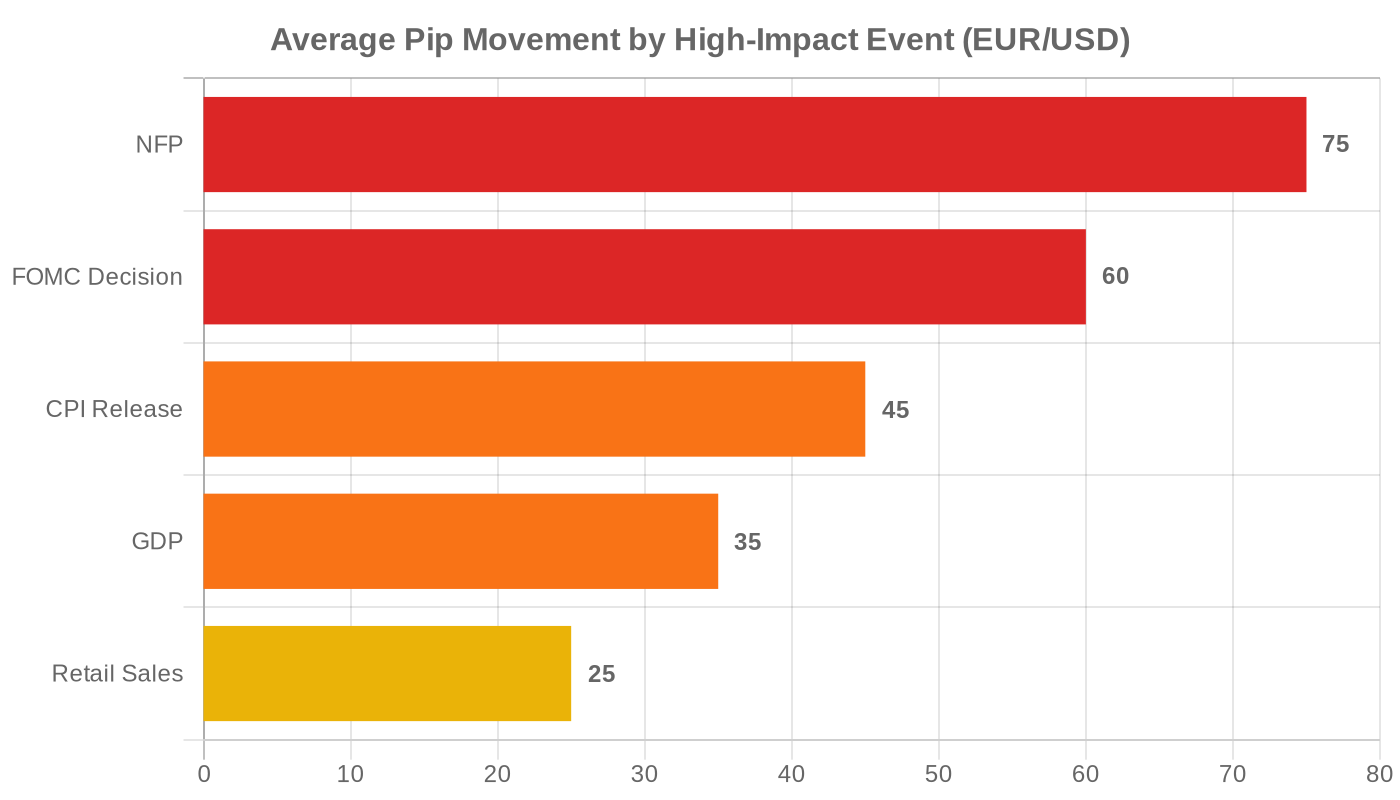
Each event on the Forex Factory calendar carries an impact rating — high, medium, or low — displayed as a colored folder icon. High-impact events (red) generate the most volatility and warrant the most attention. In a market where daily volume hit $9.6 trillion in 2025, even a single high-impact release can trigger sharp moves within seconds of publication.
The three columns that matter most sit next to each event listing:
- Forecast — what economists expect the data to show
- Previous — the last reported figure for this indicator
- Actual — the real number, updated the moment it’s released
The trading signal comes from the gap between Actual and Forecast. When the actual result deviates significantly from the consensus forecast, currency pairs react. A better-than-expected US jobs report typically strengthens the dollar. A worse-than-expected CPI reading can weaken it.
Key high-impact events to watch:
| Event | Currency | Why It Matters |
|---|---|---|
| Non-Farm Payrolls (NFP) | USD | Most-watched employment indicator; moves major pairs 50-100+ pips |
| Federal Reserve (FOMC) decisions | USD | Interest rate changes directly affect currency valuations |
| Consumer Price Index (CPI) | Multiple | Inflation gauge that signals monetary policy direction |
| GDP releases | Multiple | Broad economic health measure affecting long-term trends |
| Central bank rate decisions | All | ECB, BOE, BOJ, RBA — each moves their respective pairs |
Don’t treat every red-folder event equally. An NFP release moves markets far more than a quarterly employment cost index revision, even though both carry “high impact” labels. Context matters more than the color code.
What Is the Best Way to Trade Around News Events?
Trading around scheduled economic releases accounts for some of the highest-volatility moments in forex. According to ESMA regulatory disclosures, between 74% and 89% of retail CFD accounts lose money (ESMA, 2024). News events amplify that risk — spreads widen, slippage increases, and liquidity can thin out right when you need it most.
Here’s a framework that keeps the calendar useful without turning it into a gambling trigger:
Before the release:
- Check the Forex Factory calendar for high-impact events in your session
- Note the forecast vs. previous figures — a large expected deviation means higher volatility
- If you have an open position on the affected pair, decide now whether to close, reduce, or hold
- Avoid opening new positions within 30 minutes of a red-folder event
During the release:
- Watch the Actual column update in real time on Forex Factory
- Don’t chase the initial spike. The first move is often a head-fake before the market digests the data
- Spreads can widen to 10-20x normal during high-impact releases — your stop-loss might not execute where you set it
After the release:
- Wait for the initial volatility to settle (usually 15-30 minutes)
- Compare the actual result to both the forecast AND the previous reading
- Look for a directional bias that aligns with your forex trading strategies
I learned the hard way about NFP Friday in 2023. Had a long EUR/USD position running nicely — about 40 pips in profit. Decided to hold through the jobs report because the forecast looked benign. The actual number came in hot, dollar surged, and my 40-pip winner turned into a 25-pip loser before my stop triggered. Now I flatten everything 30 minutes before any red-folder event. Not glamorous, but it’s the rule that stopped me from giving back winners.
The bottom line with news trading: the calendar tells you when volatility is coming. What you do with that information is a risk management decision, not a directional one.
How Does Trade Explorer Help You Analyze Performance?
Trade Explorer is Forex Factory’s built-in performance analytics tool, and it’s one of the platform’s most underused features. By connecting your MT4 or MT5 trading account, Trade Explorer pulls your trade history automatically and breaks it down into metrics that reveal patterns you’d never spot from a spreadsheet.
To set it up, create a Forex Factory account (free), navigate to Trade Explorer, and link your broker account using read-only credentials. The tool imports your data without gaining any trading access — it can view your history but can’t place or modify orders.
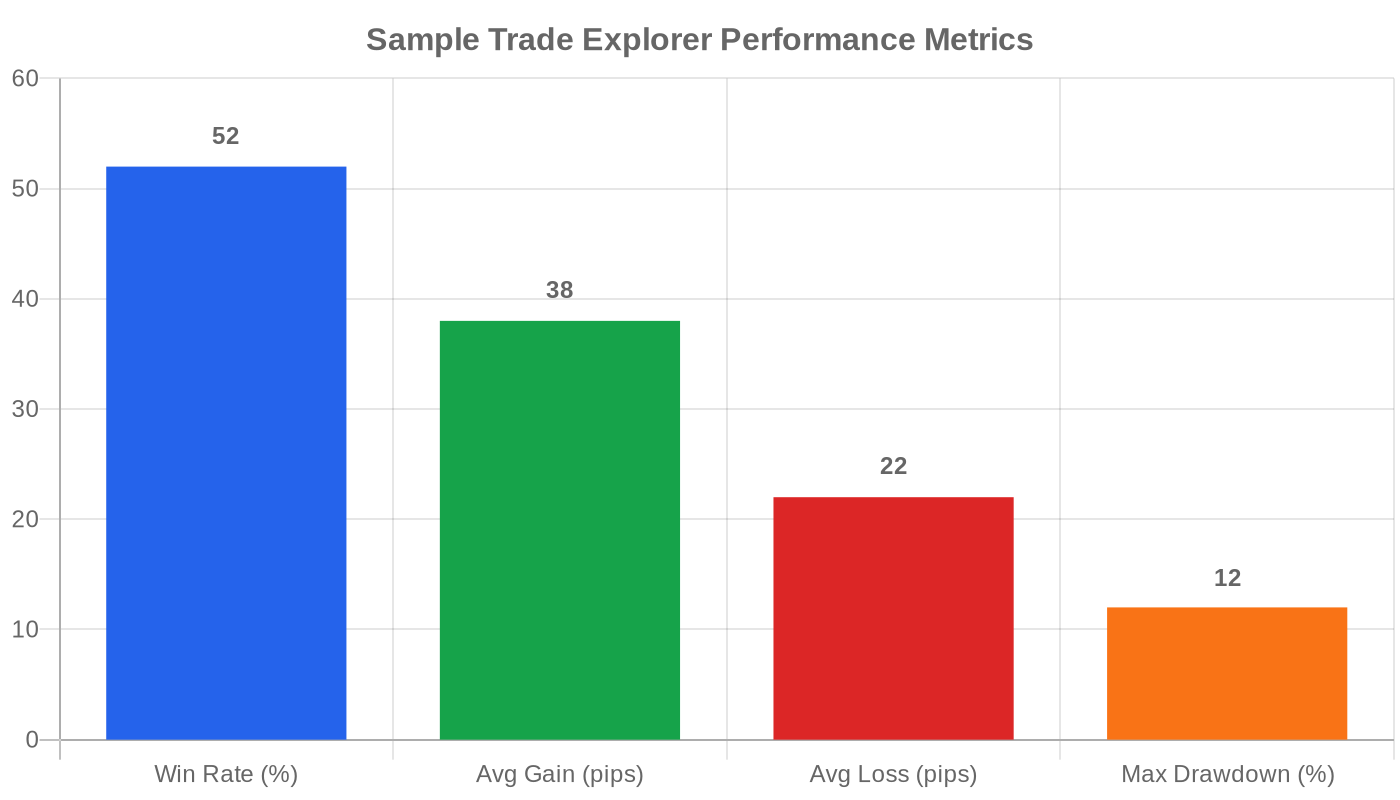
Key metrics Trade Explorer tracks:
- Win rate — percentage of trades closed in profit. Useful, but misleading in isolation. A 40% win rate with a 3:1 reward-to-risk ratio beats a 70% win rate with tiny winners and large losers.
- Average gain vs. average loss — your real edge shows here. If your average winner is smaller than your average loser, your strategy has a structural problem regardless of win rate.
- Maximum drawdown — the largest peak-to-trough decline in your account. Tells you how much pain your strategy can inflict during a losing streak.
- Equity curve — visual graph of account growth over time. Smooth upward curves suggest consistency. Jagged lines with sharp drops suggest overleveraging or inconsistent execution.
The real value of Trade Explorer isn’t any single metric — it’s the pattern recognition. You can filter by currency pair, time of day, and day of week. Maybe your GBP/JPY trades consistently underperform on Mondays. Maybe your win rate drops during Asian session trades. These patterns only surface when you have data, and most retail traders don’t track any of this.
If you’re serious about building a day trading routine, Trade Explorer is a free starting point that beats most paid trading journals.
Can Forex Factory Forums Actually Improve Your Trading?
The Forex Factory forums host thousands of active threads covering everything from scalping strategies to broker complaints. With over 500,000 registered members, the community generates more forex discussion than any single platform outside of Reddit’s r/Forex. But volume doesn’t equal quality — and that distinction matters here.
Forum sections worth your time:
- Trading Systems — users share complete strategy frameworks, often with years of forward-testing data. Some threads have thousands of pages of discussion and live results.
- Trading Journals — traders document their progress in real time. Reading someone else’s journal over six months teaches you more about trading psychology than most courses.
- Broker Discussion — real user reviews with specifics about spreads, execution speed, and withdrawal experiences. More useful than any affiliate review site.
- Interactive Trading — live trade calls and real-time analysis during market hours
What to watch out for:
The forums have no verification system. Anyone can claim a 90% win rate or post backtested results that look spectacular but fail in live conditions. The traders sharing the most aggressive profit claims are usually the ones selling something — a signal service, a course, or a managed account. If someone’s strategy is that good, why are they marketing it on a forum?
Read the forums for ideas. Test everything on a demo account. Don’t copy someone’s trade calls and expect consistent results. That applies to every piece of trading advice you encounter — including this one.
For context on how long it takes to learn forex effectively, expect a 6-24 month learning curve regardless of which community resources you use.
What Mistakes Do Beginners Make on Forex Factory?
Most of the mistakes beginners make on Forex Factory aren’t about the platform — they’re about how people process information under the pressure of real money at risk. Knowing key forex trading concepts beforehand reduces most of these errors.
Mistake 1: Trading every red-folder event. Not all high-impact events move the market equally. Preliminary GDP revisions rarely generate the same volatility as an NFP surprise. Beginners often overtrade around news because the calendar makes every event look equally important.
Mistake 2: Ignoring time zones. If you don’t set your time zone on Forex Factory, every event timestamp is wrong. Traders in Australia, Asia, and the Middle East get burned by this regularly — they prepare for an event at 2:30 PM when it’s actually happening at 2:30 AM in their local time.
Mistake 3: Copy-trading from forum posts. A thread titled “90% win rate strategy — free!” gets hundreds of replies for a reason. Most of those replies, if you read past page 3, are from people who lost money following it. Backtested results and live results are different things entirely.
Mistake 4: Skipping Trade Explorer. The majority of Forex Factory users never connect their trading account to Trade Explorer. They’re missing the single most valuable feedback loop the platform offers. You can’t improve what you don’t measure.
Mistake 5: Treating the calendar as a crystal ball. The economic calendar tells you when data will be released. It doesn’t tell you how the market will react. A “good” jobs number can still tank the dollar if the market had already priced in an even better result. Context always beats the headline.
How Does Forex Factory Compare to Its Alternatives?
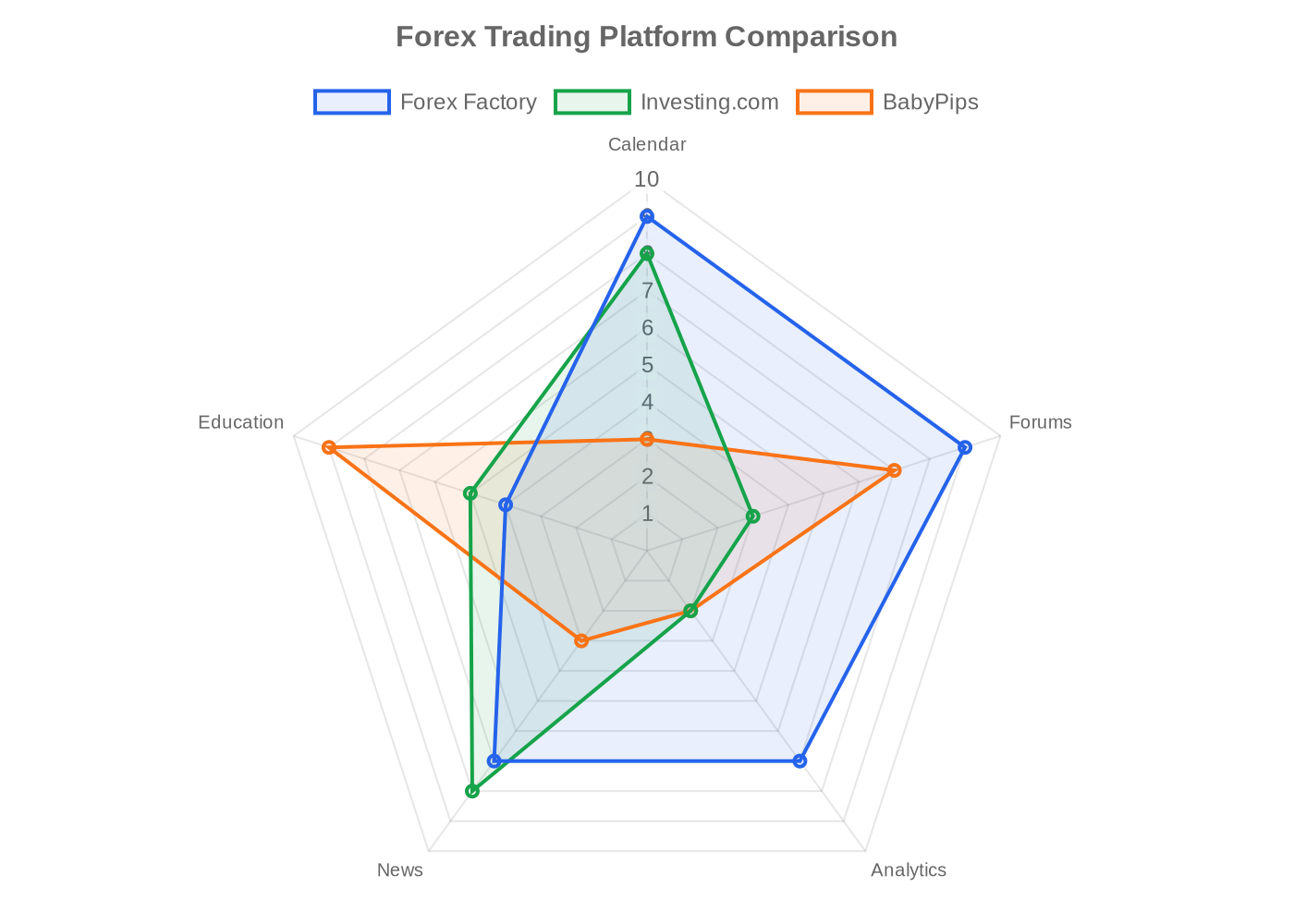
Forex Factory isn’t the only platform that offers economic calendars and community tools. Here’s how it stacks up against the main alternatives:
| Feature | Forex Factory | Investing.com | MyFXBook | DailyFX | BabyPips |
|---|---|---|---|---|---|
| Economic Calendar | Excellent — fast updates, detailed filters | Excellent — broader asset coverage | Good — basic filtering | Good — clean design | Basic |
| Community Forums | Largest forex-focused forum | Comments on articles | Trade copying community | Limited discussion | Strong educational forum |
| Trade Analytics | Trade Explorer (free) | None | AutoTrade (copy trading) | None | None |
| News Feed | Fast, forex-focused | Multi-asset coverage | Limited | Reuters-sourced | Educational only |
| Cost | Free | Free (ads) | Free + premium tiers | Free | Free |
| Best For | Active forex traders | Multi-asset traders | Social/copy traders | News-driven traders | Beginners learning forex |
Forex Factory’s strength is its forex-specific focus and the depth of its calendar. Investing.com covers more asset classes. MyFXBook is better for copy trading. DailyFX has stronger institutional-grade analysis. BabyPips is the better choice for absolute beginners who need structured courses.
Most experienced traders use two or three of these platforms — they aren’t mutually exclusive. Forex Factory for the calendar and forums, Investing.com or TradingView for broader market context.
Is Forex Factory Worth Adding to Your Trading Routine?
Forex Factory is the strongest free economic calendar available for forex traders, and Trade Explorer adds performance analytics that most competitors don’t offer at any price. In a market where daily volume now exceeds $9.6 trillion (BIS, 2025) and where ESMA reports that 74-89% of retail accounts lose money, having real-time data and structured performance tracking isn’t optional — it’s baseline.
The platform won’t make you profitable on its own. No tool does. But if you set up the calendar filters properly, use Trade Explorer to identify patterns in your trading, and treat the forums as a source of ideas rather than instructions, Forex Factory fills a gap that most traders leave open.
If you’re building toward trading forex for a living, start by linking your trading account to Trade Explorer this week.
Trading forex involves substantial risk of loss and is not suitable for all investors. Between 74% and 89% of retail investor accounts lose money when trading CFDs (ESMA). Past performance does not guarantee future results.
Frequently Asked Questions
Is Forex Factory free to use?
Forex Factory is completely free. All core features — the economic calendar, news feed, forums, and Trade Explorer — work without a paid subscription. You’ll need to create a free account to save calendar filter preferences and access Trade Explorer, but there’s no premium tier or paywall for any trading tool on the platform.
How do you read impact levels on the Forex Factory calendar?
Impact levels use a color-coded folder system. Red means high impact — events like NFP or FOMC decisions that can move major pairs 50-100 pips. Orange marks medium-impact events with moderate volatility potential. Yellow indicates low-impact releases that rarely affect trading. Filter for red and orange events to focus on what actually moves the market.
Can you connect MT4 or MT5 to Forex Factory Trade Explorer?
Yes. Trade Explorer supports both MT4 and MT5 accounts from most major brokers. You link your account using read-only investor credentials — Trade Explorer can view your trade history but cannot place, modify, or close any trades. The connection imports your data automatically and updates as you trade.
Is Forex Factory reliable for trading decisions?
The economic calendar data is reliable — event times and actual results are sourced from official releases and updated in real time. Forum content, however, is user-generated and unverified. Treat calendar data as factual and forum strategies as opinions that need independent testing on a demo account before risking real capital.
What are the best Forex Factory alternatives?
Investing.com offers the broadest multi-asset economic calendar. MyFXBook is better for copy trading and social analytics. DailyFX provides institutional-grade analysis with Reuters-sourced news. BabyPips is the best choice for beginners who need structured forex education. Most active traders use Forex Factory alongside one or two of these platforms rather than choosing just one. For more resources, see our list of best forex trading books.
About Author